
Where the time goes
The hours each person spends on each task every week, as they reported them. You see the work behind every role, not only the job title.
For operations leaders · COOs and VPs of Operations
In 7 days we map one department from your team’s own answers. You see the hours each task takes, where work waits, and which tasks an agent can prepare while a person decides.
Book a demoSee it workThe Department Operating Record. Fixed price, one time, one department.
The problem
Everyone wants to use AI. Before you can, you need to know which work takes the time and why it waits.
DutyGraph asks the people who do the work, and they confirm what we wrote before anyone else sees it.
What you get
Each finding shows who said it and whether the person who owns the work confirmed it.
The hours each person spends on each task every week, as they reported them. You see the work behind every role, not only the job title.
Every hand-off between people and teams, with the slow ones marked. Possible constraints stay labelled as hypotheses until a test supports them.
A ranked list of tasks an agent could prepare, with hours today and the predicted hours with an agent. Each agent design names the person who owns it.
DutyGraph designs and reviews the AI work with you. It does not run agents inside your systems. Predicted hours are marked as predictions.
See a sample packageIn the app
Each work flow shows who does each step and how work moves between teams. Dashed lines are still waiting to be confirmed.
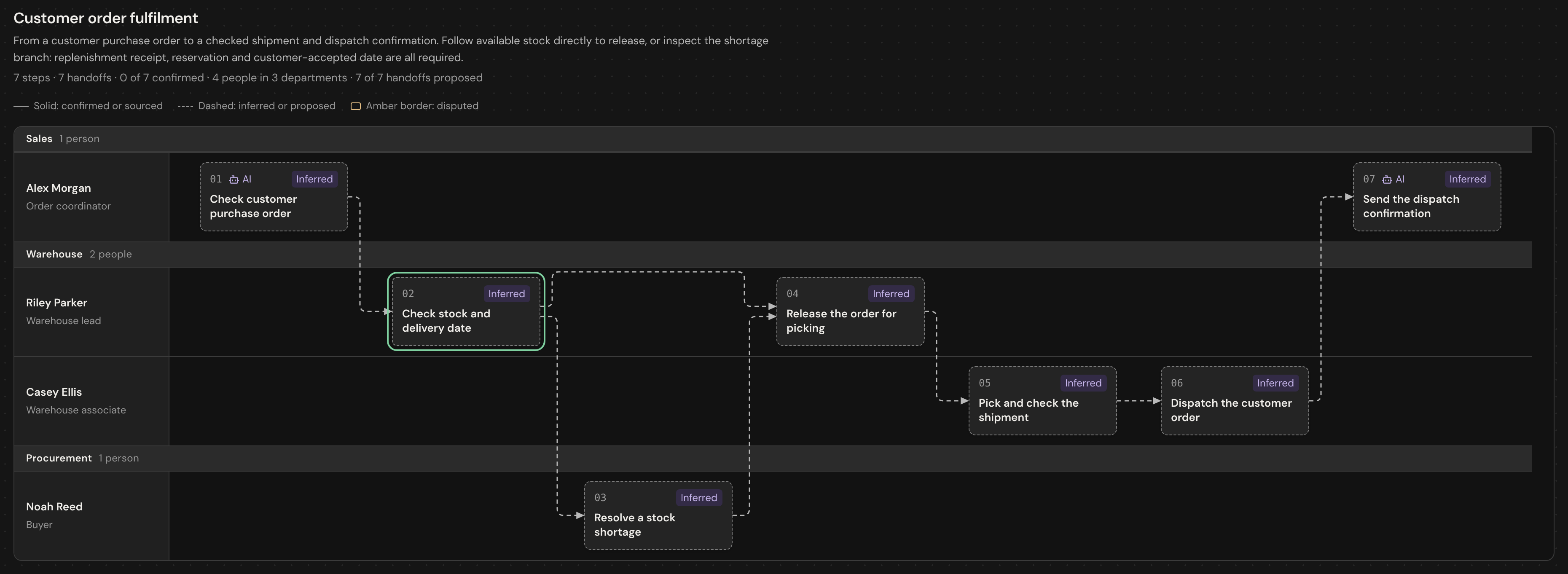
Actual app screen from the fictional Cobalt Industrial Supply sample.
How it starts
7 days for one department.
Get started
You agree the scope, plan and price on a short call before anything starts.